컴퍼넌트 스캔과 자동 DI
- 컴퍼넌트 스캔(@ComponentScan)을 통해 자동으로 설정 정보를 등록할 수 있다.
- @Autowired가 붙은 생성자는 스프링이 자동으로 의존관계를 주입해준다.
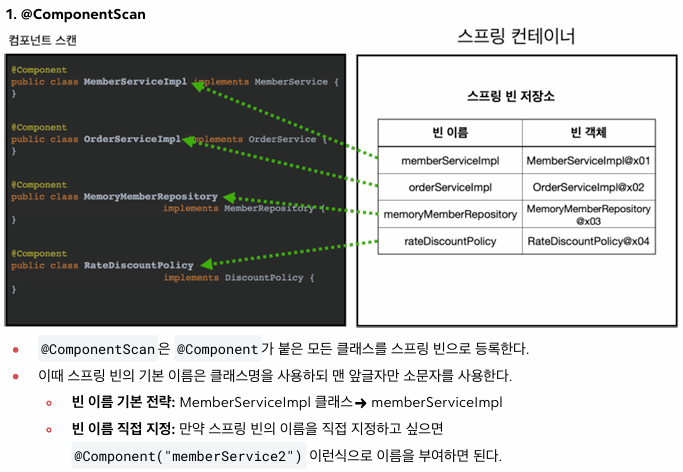
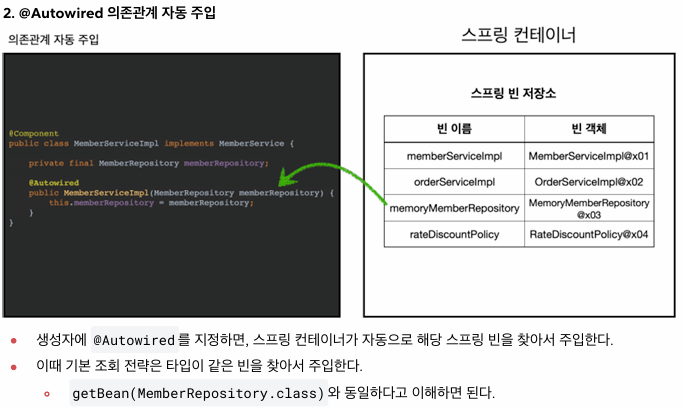 @ComponentScan과 @Autowired
탐색 위치와 기본 스캔 대상
- basePackages를 설정해주면서 탐색의 대상이 되는 시작 위치를 지정할 수 있다. 탐색할 필요가 없는 패키지는 제외하기 위함이다.
- 패키지 위치를 지정하지 않고, 설정 정보 클래스의 위치를 프로젝트 최상단에 두는 것을 권장.
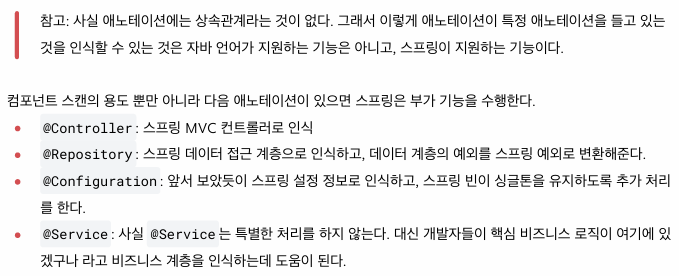
- 컴퍼넌트 스캔은 다음의 어노테이션에 대해 스캔 대상으로 삼는다. -> @Component, @Controller, @Service, @Repository, @Configuration
필터
@Target({ElementType.TYPE})
@Retention(RetentionPolicy.RUNTIME)
@Documented
public @interface MyExcludeComponent {
}


// --------------------------------------------------


@Target({ElementType.TYPE})
@Retention(RetentionPolicy.RUNTIME)
@Documented
public @interface MyIncludeComponent {
}


// --------------------------------------------------------


@MyIncludeComponent
public class BeanA {
}


// ----------------------------------------------------------


@MyExcludeComponent
public class BeanB {
}


// --------------------------------------------------------


public class ComponentFilterAppConfigTest {

    @Test
    void filterScan() {
        AnnotationConfigApplicationContext ac = new AnnotationConfigApplicationContext(ComponentFilterAppConfig.class);
        BeanA beanA = ac.getBean("beanA", BeanA.class);
        assertThat(beanA).isNotNull();

        assertThrows(
                NoSuchBeanDefinitionException.class,
                () -> ac.getBean("beanB", BeanB.class));
    }

    @Configuration
    @ComponentScan(
            includeFilters = @ComponentScan.Filter(type = FilterType.ANNOTATION, classes = MyIncludeComponent.class),
            excludeFilters = @ComponentScan.Filter(type = FilterType.ANNOTATION, classes = MyExcludeComponent.class)
    )
    static class ComponentFilterAppConfig {

    }

}
중복 등록과 충돌
- 같은 빈 이름이 등록될 수 있다.
- (자동 빈 등록 vs 자동 빈 등록) -> ConflictingBeanDefinitionException 예외 발생
- (수동 빈 등록 vs 자동 빈 등록) -> 수동 빈 등록이 우선권을 가져서 오버라이딩 함. -> 잡기 어려운 애매한 버그 발생 가능성
- 그래서 수동 빈이 자동 빈을 오버라이딩하면, CoreApplication을 실행하면 스프링이 오류를 발생시킨다.
