
static/index.html을 올려두면, 스프링 부트가 Welcome page를 제공해준다.
컨트롤러
- @Controller 어노테이션을 통해 클래스를 컨트롤러로 선언 가능.
- View와 데이터를 연결하는 역할을 한다.
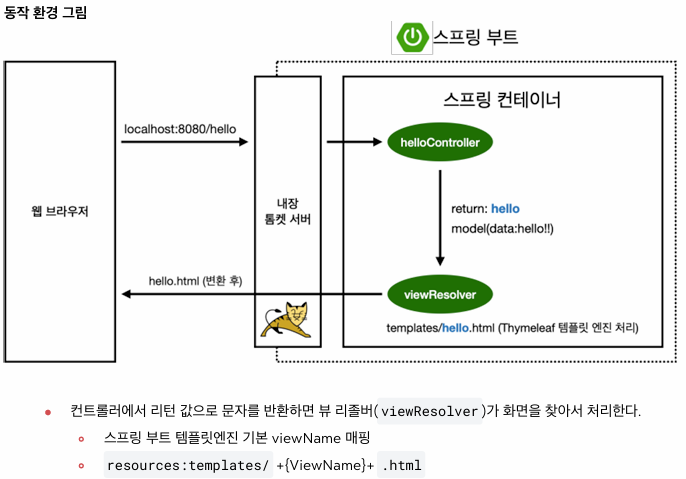
- @GetMapping()은 HTTP GET 요청이 들어오면 해당 메서드를 호출하고 View Resolver가 템플릿에서 뷰를 반환한다.
@Controller
public class HelloController {

    @GetMapping("hello")
    public String hello(Model model) {
        model.addAttribute("data", "hello!");

        /**
         * 문자를 리턴하면, viewResolver가 화면을 찾아서 처리해줌
         * resources:templates/ + {ViewName} + .html
         */
        return "hello";
    }
}


// Hello.html
<!DOCTYPE HTML>
<html xmlns:th="http://www.w3.org/1999/xhtml">
<head>
    <title>Hello</title>
    <meta http-equiv="Content-Type" content="text/html; charset=UTF-8" />
</head>
<body>
// 컨트롤러에서 전달한 data 값 출력
<p th:text="'안녕하세요. ' + ${data}">안녕하세요. 손님</p>
</body>
</html>
정적 컨텐츠
- 서버의 별도 처리 없이 브라우저에 그대로 전달된다. resources/static/ 디렉토리의 파일을 정적 컨텐츠로 제공.
<!DOCTYPE HTML>
<html>
<head>
    <title>static content</title>
    <meta http-equiv="Content-Type" content="text/html; charset=UTF-8" />
</head>
<body>
정적 컨텐츠 입니다.
</body>
</html>
MVC와 템플릿 엔진
- HTTP GET 요청을 http://localhost:8080/hello-mvc?name=John 이런 식으로 보내면 실행
// 요청할 때 들어온 name value가 String name 변수에 들어감
@GetMapping("hello-mvc")
public String helloMvc(@RequestParam(value="name") String name, Model model) {
    model.addAttribute("name", name);

    return "hello-template";
}


<html xmlns:th="http://www.thymeleaf.org">
<body>
<p th:text="'hello ' + ${name}">hello! empty</p>
</body>
</html>

API
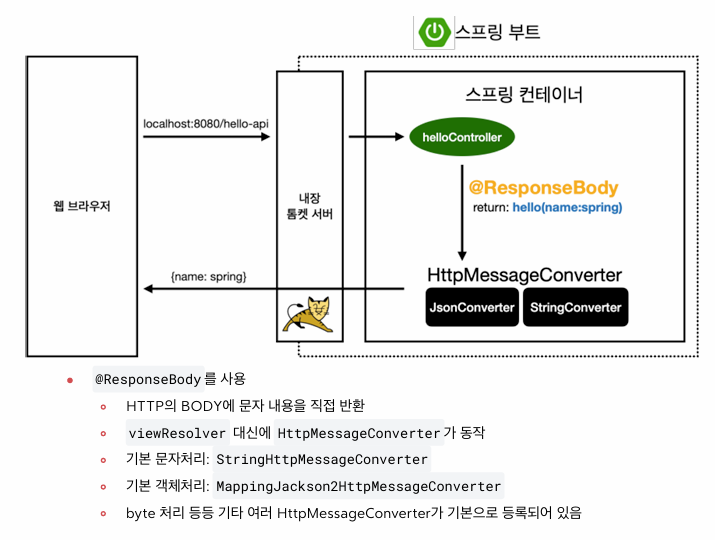
- @ResponseBody 어노테이션을 통해 구현. 뷰 파일을 찾지 않고, 메소드의 반환 값을 그대로 HTTP 응답에 넣어준다.
- 반환할 때 HttpMessageConverter가 JSON 혹은 String 형태로 변환해서 반환해준다.
- 디폴트는 StringHttpMessageConverter이고, 객체라면 MappingJackson2HttpMessageConverter.
// helloString() → 문자열을 직접 응답 (StringHttpMessageConverter)
@GetMapping("hello-string")
@ResponseBody
public String helloString(@RequestParam("name") String name) {
    return "hello " + name;
}

// helloApi() → 객체를 반환하여 JSON 응답 (MappingJackson2HttpMessageConverter)
@GetMapping("hello-api")
@ResponseBody
public Hello helloApi(@RequestParam("name") String name) {
    Hello hello = new Hello();
    hello.setName(name);

    return hello; // {"name":"John"} → JSON 응답
}
'공부 > Spring' 카테고리의 다른 글
| [스프링 핵심 원리 1 / 인프런 김영한] 객체 지향 설계와 스프링 (0) | 2025.03.20 |
|---|---|
| [스프링 입문 5] AOP (0) | 2025.03.15 |
| [스프링 입문 4] 스프링 DB 접근 (0) | 2025.03.15 |
| [스프링 입문 3] 스프링 빈, 의존 관계 설정과 웹 MVC 개발 (0) | 2025.03.14 |
| [스프링 입문 2] DB 없이 메모리 기반 회원 관리 예제 (0) | 2025.03.14 |